

Key Facts
- Campaign: A brand-deal scam targeting YouTube creators, identified by ESET
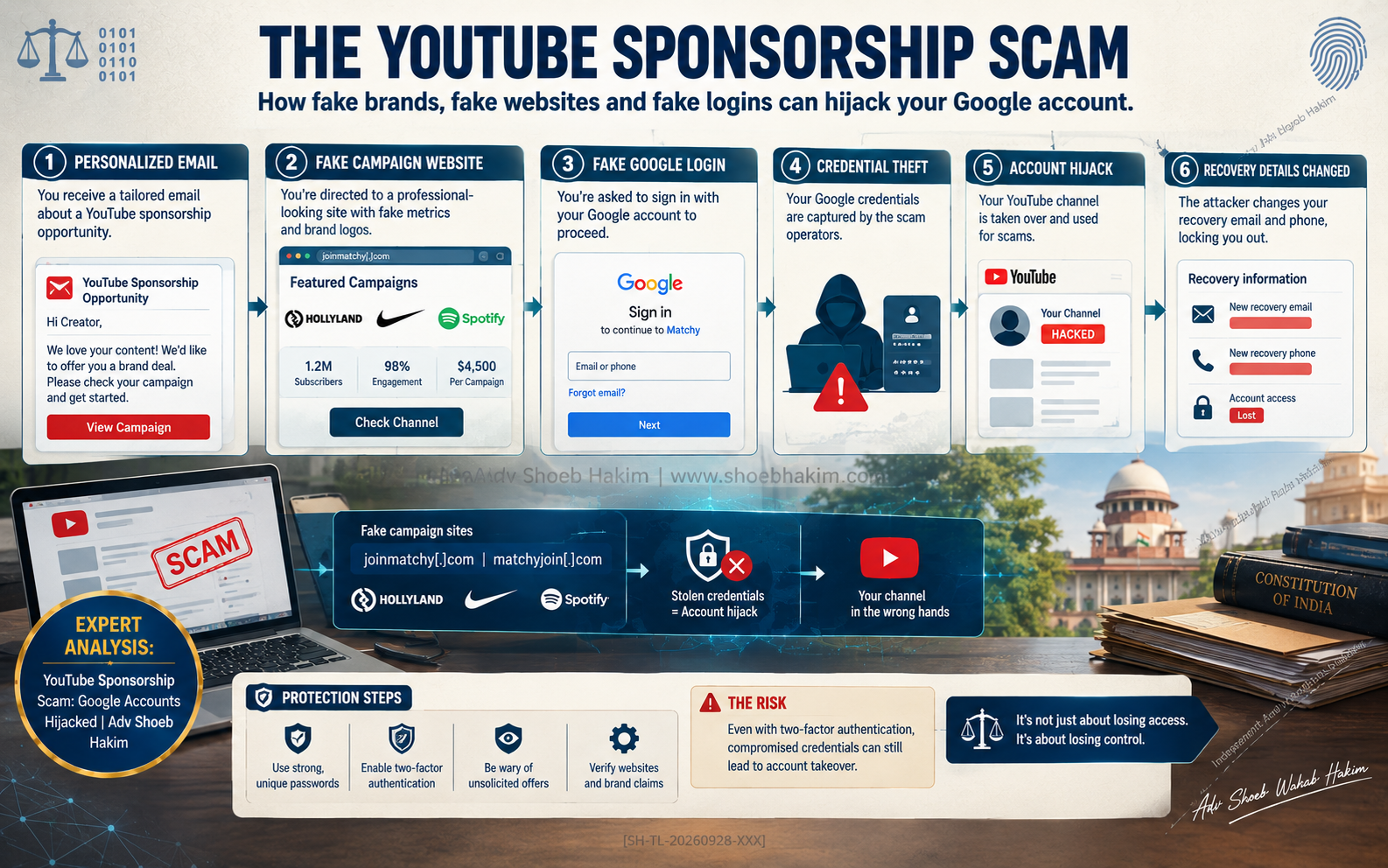
- Tactic: Attackers impersonate real brands such as Hollyland, Nike, and Spotify and send personalized sponsorship offers
- The Trap: Fake campaign websites mimic legitimate sponsorship platforms and ask creators to sign in with Google to “check channel” metrics
- What Is Stolen: Google login credentials and one-time codes, allowing attackers to hijack accounts
- Consequences: Hijacked accounts lose recovery details; attackers change phone numbers and backup emails; connected services like Gmail and Drive are exposed
- Domains Used: joinmatchy[.]com, matchyjoin[.]com, and subdomains
- Brand Warning: Hollyland, the impersonated company, has warned creators about the fraud
- Protection: Verify sponsorship offers through official channels; check that sign-in pages use the provider’s domain (e.g., accounts.google.com); enable 2FA and passkeys
Direct Answer
YouTube creators are being targeted by a sophisticated phishing campaign that uses fake sponsorship offers to hijack their Google accounts. The attackers impersonate real brands, send personalized emails that reference the creator’s content, and direct them to a fake campaign website that mimics a legitimate sponsorship platform.
The website includes fake campaign metrics, an income calculator, and logos of major companies. It retrieves public data from the creator’s channel and then prompts them to sign in with Google to “check channel” performance. The sign-in page is a phishing page that captures the password and one-time code. Once the attackers have access, they change the account’s recovery details—removing the creator’s phone number and backup email—and replace them with their own.
This locks the creator out and gives the attackers access to connected services like Gmail and Google Drive. The campaign has targeted creators globally, using domains like joinmatchy[.]com and matchyjoin[.]com.
The legitimate “Sign in with Google” flow only shares name, email, and profile picture, but the fake page asks for more. Creators must verify offers through official channels and check the domain of any sign-in page before entering credentials.
In this article:
- How the Sponsorship Scam Works
- The Fake Campaign Platform
- The Google Login Trap
- The Hijack: What Happens After Credentials Are Stolen
- Who Is Being Targeted
- The Legal Framework: IT Act, DPDP Act, and CERT-In
- What Creators Must Do to Protect Themselves
- Frequently Asked Questions (FAQ)
By Adv. Shoeb Hakim — Criminal defence, AML, digital forensics, and cybercrime specialist; former General Counsel, Credit Suisse; training police forces since 1996.
How the Sponsorship Scam Works
The scam follows a carefully constructed sequence designed to appear legitimate at every step.
Step 1: The personalized email
The attacker sends an email offering a sponsorship deal. The email references the creator’s content and offers a long-term partnership. It appears to come from a known brand, such as Hollyland, Nike, or Spotify.
Step 2: The fake campaign website
The email links to a website that mimics a legitimate sponsorship platform. The site includes fake campaign metrics, logos of major companies, an income calculator, and other features designed to look like an established business.
Step 3: The “check channel” prompt
The website asks the creator to sign in with Google to “check channel” performance and estimate potential revenue. This is the trap.
Step 4: The Google login page
The sign-in page appears to be Google’s login page, but it is a phishing page. It captures the password and the one-time code. In at least one case, the prompt appeared twice.
Step 5: The hijack
Once the attackers have the credentials and the one-time code, they access the Google account. They remove the creator’s phone number and backup email address and replace them with their own. They change the password. The creator is locked out.
The Fake Campaign Platform
The fake platform is designed to look like a real business.
Features observed by ESET:
- Fake campaign metrics
- Logos of major companies
- Income calculator
- Professional design and branding
- Public data retrieved from the creator’s channel
The platform appears to be a legitimate sponsorship marketplace. It asks the creator to authenticate to “verify” their channel and estimate earnings. The authentication step is the point of attack.
The domains:
Attackers used joinmatchy[.]com, matchyjoin[.]com, and their subdomains. These domains are not associated with the brands being impersonated. That is the warning sign—if the domain does not match the brand, the offer is not legitimate.
The Google Login Trap
The fake sign-in page mimics Google’s authentication flow.
How it works:
The legitimate “Sign in with Google” flow shares only name, email address, and profile picture with third-party sites, unless the user is asked for more permissions, such as the ability to manage a YouTube channel. Attackers exploit this by creating a fake page that appears to be Google’s login page but is designed to capture the password and one-time code.
The two-step prompt:
In at least one reported case, the prompt appeared twice. The first prompt may have been a legitimate Google sign-in; the second was the phishing page. The victim reported: “I immediately stopped and got into my Google account to check on things and change my password. By that time, they had already gotten into my account and removed my phone number, backup email address, and more, and replaced it with theirs.”
The warning sign:
Before signing in with Google, Apple, Facebook, or any single sign-on provider, check that the sign-in page matches the provider’s domain—for example, accounts.google.com. If the domain is different, it is a phishing page.
The Hijack: What Happens After Credentials Are Stolen
Once the attackers have access, the consequences escalate quickly.
Immediate actions by the attacker:
- Change the account password
- Remove the creator’s phone number from recovery options
- Remove the creator’s backup email address
- Add the attacker’s own phone number and backup email
- Change recovery codes
- Access connected services including Gmail, Google Drive, and YouTube
The impact on the creator:
- Locked out of their own account
- Unable to reset password through normal recovery channels
- Loss of access to emails, documents, and YouTube channel
- Risk of the channel being used for further scams or monetization by the attacker
For a YouTuber:
Personal sponsorship offers and collaboration platforms are a routine part of business. Attackers weaponize this routine. The scam looks like a normal business opportunity until the account is gone.
Who Is Being Targeted
The campaign targets YouTube creators globally.
Known targets:
- A creator who received a fake offer from “Hollyland”
- A journalist in Peru who received a “Paid collaboration opportunity” from a scammer calling themselves Brandi
Brands impersonated:
- Hollyland
- Nike
- Spotify
The targeting pattern:
Attackers are constantly changing domains and names, repackaging the campaign under different brand identities. They target creators across the globe. The common thread is a personalized offer that references the creator’s content and directs them to a fake platform.
The Legal Framework: IT Act, DPDP Act, and CERT-In
The scam engages several provisions of Indian law.
Information Technology Act, 2000
- Section 66C: Identity theft—fraudulently or dishonestly making use of another person’s electronic signature, password, or unique identification feature. Punishable with imprisonment up to three years and fine up to ₹1 lakh.
- Section 66D: Cheating by personation using a computer resource or communication device. Punishable with imprisonment up to three years and fine up to ₹1 lakh.
Digital Personal Data Protection Act, 2023
If the hijacked account contains personal data of the creator or third parties, the breach may trigger obligations under the DPDP Act. The creator, as a Data Fiduciary for their own data and possibly that of others, must implement reasonable security safeguards and report breaches.
CERT-In Directions
Specified cyber incidents must be reported to CERT-In within six hours of noticing the incident or being informed about it. Account hijacking may qualify as a reportable incident.
The practical reality:
The attackers are often outside Indian jurisdiction. Recovery depends on the platform—Google’s account recovery process—and on the speed of reporting.
What Creators Must Do to Protect Themselves
1. Verify sponsorship offers through official channels
Find the brand’s contact details independently. Do not use the contact information in the email. Contact the brand directly through its official website or social media.
2. Check the domain of the sign-in page
Before entering credentials, check that the sign-in page matches the provider’s domain. For Google, it should be accounts.google.com. For Apple, it should be appleid.apple.com.
3. Never sign in with Google to “check channel” metrics
Legitimate platforms do not require you to sign in with Google to check your own channel. If a website asks you to do this, it is a red flag.
4. Enable two-factor authentication (2FA) or passkeys
Even if the password is stolen, 2FA can prevent access. Passkeys are even stronger. Enable them on all accounts.
5. Use strong, unique passwords
Do not reuse passwords across services. Use a password manager.
6. Review Google Security Checkup
If you suspect your account was compromised, run Google Security Checkup. Review recent security events, signed-in devices, sign-in methods, recovery information, and third-party connections. Remove any devices, apps, or access you do not recognize.
7. Change your password immediately
If you suspect compromise, change your password. If you can no longer log in, use Google’s official account recovery page.
8. Report the incident
Report the phishing email to the brand being impersonated and to Google. If you are in India, report to CERT-In and the National Cyber Crime Reporting Portal.
Frequently Asked Questions (FAQ)
What is the YouTube sponsorship scam?
A phishing campaign where attackers impersonate real brands, send personalized sponsorship offers, and direct creators to fake campaign websites that steal Google login credentials.
How do the attackers steal credentials?
The fake website prompts the creator to sign in with Google to “check channel” metrics. The sign-in page is a phishing page that captures the password and one-time code.
What happens after the credentials are stolen?
The attackers change the account password, remove the creator’s recovery phone number and backup email, and replace them with their own. The creator is locked out.
What brands are being impersonated?
Hollyland, Nike, and Spotify have been identified. Attackers constantly change brands and domains.
What are the warning signs?
The domain of the platform does not match the brand. The sign-in page may not be on the provider’s official domain. The offer asks you to sign in with Google to check your own channel metrics.
What should creators do if they suspect compromise?
Run Google Security Checkup. Review recent security events and signed-in devices. Change your password. If locked out, use Google’s official account recovery page.
What legal provisions apply in India?
Section 66C (identity theft) and Section 66D (cheating by personation) of the IT Act, 2000. The DPDP Act may apply if personal data is breached. CERT-In reporting may be required.
How can creators verify a sponsorship offer?
Find the brand’s contact details independently. Do not use the contact information in the email. Contact the brand through its official website or social media.
What is the safest way to sign in with Google?
Check that the sign-in page uses accounts.google.com. If the domain is different, do not enter credentials.
What security measures should creators enable?
Two-factor authentication, passkeys, strong unique passwords, and regular security checkups.
Explore More:
Disclaimer: This content is for informational purposes only and does not constitute legal advice. Readers should consult qualified legal counsel for advice on their specific circumstances.
#AdvShoebHakim #YouTubeScam #Phishing #AccountHijacking #ESET #CyberSecurity #DigitalForensics #LegalDefense #Compliance #ITAct
Additional Page Metadata
Author:
Adv. Shoeb Hakim
Author Bio:
Adv. Shoeb Hakim is a Mumbai-based criminal defence, AML, digital forensics and cybercrime specialist. Former General Counsel at Credit Suisse. Has been training police forces since 1996. Provides expert commentary on cybercrime, phishing, and digital fraud.
Article Publisher:
Adv. Shoeb Hakim
Article Section:
Cybercrime | Phishing | Digital Fraud | Data Protection
Article Tags:
YouTube sponsorship scam, phishing, Google account hijack, ESET, Hollyland, Nike, Spotify, joinmatchy, IT Act Section 66C, DPDP Act, CERT-In, Adv Shoeb Hakim
Leave a Reply