A browser-based prompt injection technique exploits ChatGPT’s page summarization feature. Attacker-controlled links, fake security alerts, and QR codes render inside the trusted ChatGPT interface.
Introduction
You ask ChatGPT to summarize a web page. A public GitHub README. A blog post. A documentation portal. A SaaS dashboard.
The AI does its job.
But hidden inside that page was a malicious instruction. Now the summary contains phishing links. Fake security alerts. QR codes.
All inside the trusted ChatGPT interface. You cannot tell what is real.
This is ChatGPhish — a browser-based prompt injection technique discovered by researchers at Permiso.
This article analyzes the attack, its implications, and the mitigations that security teams must implement.
What Is ChatGPhish?
ChatGPhish is a browser-based prompt injection technique that transforms any web page into a phishing delivery surface by exploiting ChatGPT’s page summarization feature.
The researchers: Permiso
The vulnerability: ChatGPT’s response renderer trusts Markdown links and image URLs originating from third-party summarized content
The impact: Attacker-controlled links, fake security alerts, and QR codes render directly inside the trusted ChatGPT interface
How the Attack Works
Step 1: Attacker Prepares the Web Page
The attacker appends a small instruction payload to any publicly accessible web page. This could be:
- A GitHub README
- A documentation portal
- A blog post
- A SaaS dashboard
- Any page the attacker controls or can influence
Step 2: User Asks ChatGPT to Summarize
The user, trusting ChatGPT, asks the AI to summarize the page.
Step 3: ChatGPT Fetches and Processes
ChatGPT fetches the web page content, including the attacker’s hidden instruction. The AI cannot reliably distinguish between legitimate content and attacker-supplied instructions (OWASP LLM01:2025).
Step 4: Manipulated Response Is Rendered
The manipulated response is rendered inside ChatGPT’s interface. Because the renderer trusts Markdown and image URLs from summarized content, the attacker’s payload executes.
Step 5: User Is Deceived
The user sees:
- Attacker-controlled Markdown links (no origin labeling)
- Spoofed system alerts styled as legitimate ChatGPT notifications
- Auto-rendered QR codes
- All indistinguishable from genuine ChatGPT output
The Attack Primitives
| Primitive | Description | Impact |
|---|---|---|
| UI redress / phishing | Attacker-controlled Markdown links render as live, clickable elements inside ChatGPT interface with no origin labeling | Users cannot distinguish injected URLs from legitimate ones |
| Spoofed system alerts | Attacker text styled as legitimate “account security” notifications | Inherits visual trust of ChatGPT’s own UI |
| QR code pivot | Auto-rendered QR codes fetched from attacker-controlled S3 buckets | Bypasses desktop URL defenses (hover previews, browser blocklists, password manager checks) because destination only visible after scanning on second device |
| Passive tracking beacon | Markdown images embedded via URL shorteners auto-fetched on every render | Leaks victim’s IP address, User-Agent, Referer header, and high-resolution timing to attacker infrastructure |
Why Traditional Security Fails
Same-Origin Policy Offers No Protection
The AI assistant executes with the user’s authenticated context. The browser’s same-origin policy does not protect against this attack because the malicious content is generated by the AI, not directly from the attacker’s domain.
Traditional Web Security Boundaries Are Irrelevant
The attack does not require the user to click on a suspicious link. The user is already inside ChatGPT’s trusted interface. Every link, every alert, every QR code appears to come from the AI itself.
OWASP LLM01:2025
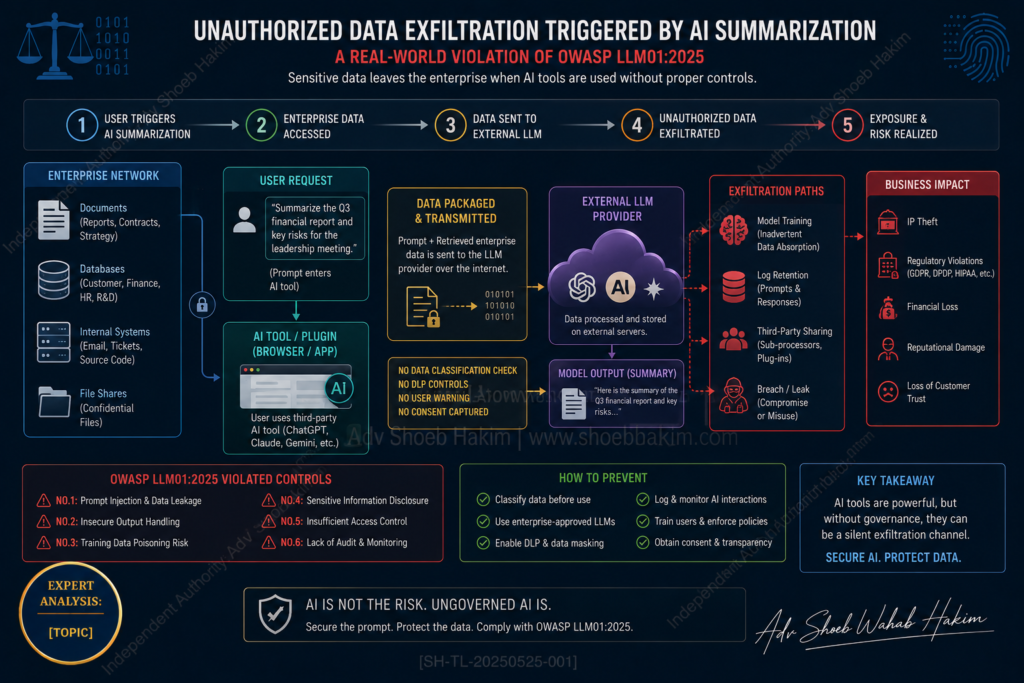
The OWASP Top 10 for LLM Applications identifies prompt injection as the top risk: LLMs cannot reliably distinguish between legitimate instructions and attacker-supplied content embedded in retrieved data.
The Disclosure Timeline
| Date | Event |
|---|---|
| April 29, 2026 | Permiso submitted initial vulnerability report to OpenAI via Bugcrowd (cited as “Untrusted Markdown Rendering Leads to XSS, Phishing, and Data Exfiltration”) |
| May 1, 2026 | Revised submission with expanded proof-of-concept steps; subsequently classified as duplicate of previously reported issue |
| May 7, 2026 | Follow-up communication clarifying broader phishing, QR-code, and passive tracking implications |
| May 29, 2026 | Research publicly published |
Mitigations for Security Teams
Until clear source separation is enforced between retrieved web content and rendered assistant output, security teams should apply the following mitigations:
1. Avoid Risky Summarization
Avoid using AI browser summarization features on pages containing user-generated or untrusted content, including:
- Public GitHub READMEs
- Blogs
- Any page with third-party content
2. Restrict AI Browser Permissions
Restrict AI browser permissions to the minimum necessary. Require human approval before any link interaction within summarized responses.
3. Treat AI Output as Untrusted
Treat any clickable link, image, or alert appearing inside an AI summary as potentially attacker-controlled until origin attribution is clearly displayed.
4. Deploy Input/Output Filtering
Deploy semantic input/output filtering and anomaly detection on AI-integrated surfaces within enterprise environments.
5. Monitor Activity Logs
Monitor AI browser activity logs for unexpected outbound image fetch requests to unknown or URL-shortened endpoints.
The Structural Problem
The ChatGPhish research underscores a structural challenge facing all browser-integrated AI summarization systems:
As long as attacker-controlled web content can influence rendered assistant output without explicit origin labeling, the browser itself remains a practical, low-barrier delivery surface for phishing, device pivoting, and passive reconnaissance.
This is not a vulnerability in ChatGPT alone. Any browser-integrated AI summarization system that trusts retrieved web content without source separation is vulnerable to similar attacks.
Implications for Enterprises
For security teams:
- AI browser tools are now an attack surface
- Traditional web filters and blocklists will not stop these attacks
- User education alone is insufficient
- Technical controls must be deployed
For compliance teams:
- Data exfiltration via passive tracking beacons may violate data protection regulations
- Phishing attacks originating from within trusted AI interfaces create liability risks
- Vendor risk assessments must include AI-integrated tools
For employees:
- Do not assume that content inside ChatGPT is safe or verified
- Be suspicious of links, alerts, and QR codes even when they appear inside trusted AI interfaces
- Report any unexpected behaviour in AI tools
Conclusion
Researchers at Permiso have disclosed ChatGPhish — a browser-based prompt injection technique that transforms any web page into a phishing delivery surface by exploiting ChatGPT’s page summarization feature.
By appending a small instruction payload to any publicly accessible web page, an unauthenticated attacker can influence how ChatGPT structures and renders its summarization output.
Because chatgpt.com‘s response renderer trusts Markdown links and image URLs originating from third-party summarized content, four attack primitives become available:
- UI redress/phishing (attacker-controlled links with no origin labeling)
- Spoofed system alerts (inheriting visual trust of ChatGPT’s UI)
- QR code pivot (bypassing desktop URL defenses)
- Passive tracking beacon (leaking IP, User-Agent, timing data)
The ChatGPhish research underscores a structural challenge facing all browser-integrated AI summarization systems: as long as attacker-controlled web content can influence rendered assistant output without explicit origin labeling, the browser itself remains a practical, low-barrier delivery surface for phishing, device pivoting, and passive reconnaissance.
Until clear source separation is enforced between retrieved web content and rendered assistant output, security teams must treat any clickable link, image, or alert appearing inside an AI summary as potentially attacker-controlled.
Q: How does an attacker execute the ChatGPhish vulnerability without hacking my computer? Ans: The attacker does not need to hack your computer. They simply hide a malicious instruction (a prompt injection payload) on a public web page, like a blog or GitHub README. When you ask your AI assistant to summarize that page, the AI accidentally executes the hidden instructions, delivering the phishing attack directly to your screen.
Q: Why doesn’t my company’s firewall block these malicious links? Ans: Because the ChatGPhish payload is processed and rendered by the trusted AI system itself. Your company’s firewall sees a secure, legitimate connection to a highly trusted domain (like chatgpt.com), allowing the spoofed alerts and malicious Markdown links to bypass traditional perimeter security.
Q: What is a “Passive Tracking Beacon” in the context of this attack? Ans: An attacker can instruct the AI to render an invisible or tiny image hosted on their own servers. When the AI interface automatically loads this image, it acts as a passive tracking beacon, silently leaking your IP address, browser type (User-Agent), and exact timing data back to the attacker.
What specific AI feature does the ChatGPhish vulnerability exploit?
- Ans: The browser-based page summarization feature.
Which research group originally discovered and reported the ChatGPhish technique?
- Ans: Researchers at Permiso.
Why do traditional desktop URL defenses fail against the “QR code pivot” attack primitive?
- Ans: Because the malicious destination URL is only visible after the user scans the auto-rendered QR code with a secondary mobile device.
Which specific OWASP standard identifies prompt injection as the top risk for Large Language Models?
- Ans: OWASP LLM01:2025.
Adv. Shoeb Hakim
AI Security & Cybersecurity Advisor
📌 Follow me on LinkedIn for daily AI security and cybersecurity insights: https://www.linkedin.com/in/shoebhakim
📌 Visit my website for more articles: https://shoebhakim.com
📌 Visit my website for research fellowship: https://www.legalcomplaince.in
♻️ Share this article with your network.
Disclaimer: This article is for informational purposes only and does not constitute legal advice.
Hashtags: #ChatGPhish #ChatGPT #OpenAI #PromptInjection #AIsecurity #LLMsecurity #Phishing #BrowserSecurity #Permiso #XSS #DataExfiltration #MarkdownInjection #QRCodePhishing #OWASPLLM #LLM01 #BrowserAI #AISummarization #TrustBoundaries #CyberSecurity #InfoSec #VulnerabilityDisclosure #BugCrowd #ResponsibleDisclosure #CrossPromptInjection #XPIA #MicrosoftCopilot #SameOriginPolicy #WebSecurity #AIRisks #EmergingThreats #RedTeaming #ThreatIntelligence #SecurityResearch #AIThreats #LLMVulnerabilities #PromptInjectionAttack #AIPhishing #SupplyChainAttack #WebContentPoisoning #ClientSideThreats #ZeroTrust #AIHygeine #BrowserExtensions #ChatGPTPlugin #LLMIntegration #AIAttackSurface #AdvShoebHakim