Remote Desktop Protocol (.rdp) files have become a weapon of choice for phishing attacks. Microsoft just added a critical safeguard.
Introduction
A single .rdp file. Double-click. The user thinks they are connecting to their office server. They are not. They are connecting to an attacker’s machine.
This is not a hypothetical scenario. Threat actors have increasingly weaponized Remote Desktop Protocol (.rdp) files to trick users into establishing connections that silently redirect sessions to attacker-controlled infrastructure.
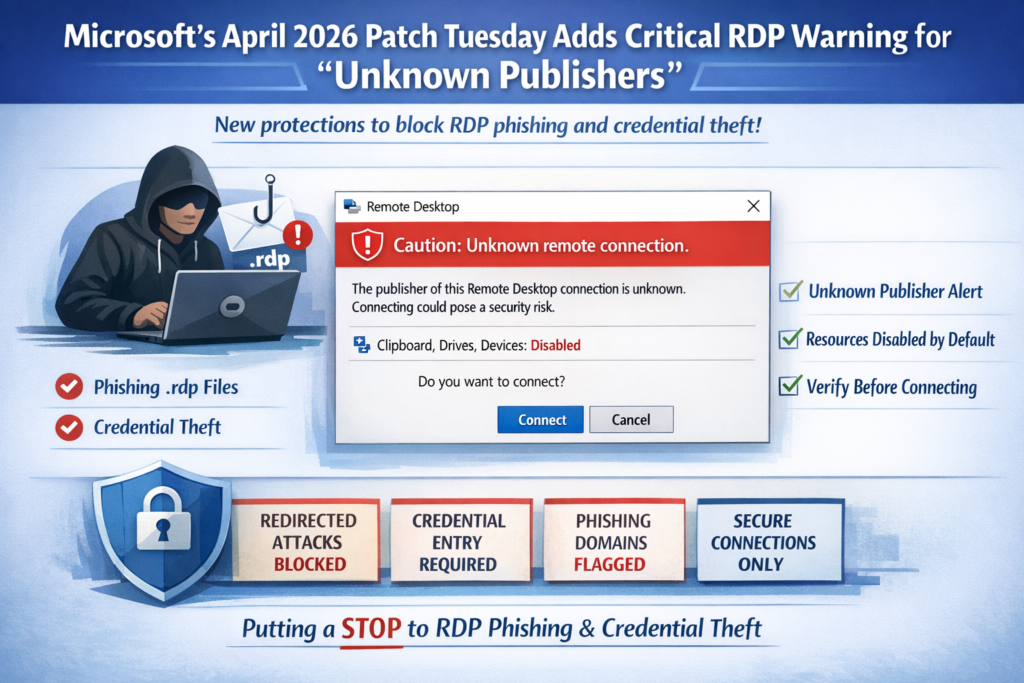
The April 2026 Patch Tuesday security update from Microsoft introduces a significant behavioral change to the Windows Remote Desktop Connection application (MSTSC). New warning dialogs are designed to protect users from phishing attacks that exploit .rdp files.
The Threat: Weaponized .rdp Files
Remote Desktop Protocol allows users to connect to remote computers over a network. Legitimate use is widespread—IT support, remote work, system administration.
But attackers have found a way to exploit this legitimate tool.
How the Attack Works:
- Attacker crafts a malicious .rdp file
- File is sent via email, disguised as IT support communication
- User double-clicks the file, trusting the source
- The .rdp file silently redirects the connection to attacker-controlled infrastructure
- Attacker captures credentials, accesses internal network, deploys malware or ransomware
The user never knows. The connection looks legitimate. The damage is done.
What Changed in the April 2026 Update
Microsoft’s April 2026 Patch Tuesday update introduced a new warning dialog in the Windows Remote Desktop Connection application (MSTSC).
Key Changes:
| Before Update | After Update |
|---|---|
| Minimal warning on .rdp file execution | Enhanced security warning dialog |
| No clear publisher identification | Publisher field shows “Unknown publisher” for untrusted files |
| Users could proceed without clear risk indication | “Unknown publisher” flagged as highest-risk scenario |
| Limited ability to identify tampered files | Clear warning that connection may be unsafe |
The Critical Feature:
When a user attempts to open an .rdp file, the system now displays:
- The publisher field showing “Unknown publisher”
- Clear warnings that the connection may be unsafe or tampered
- An explicit opportunity to cancel before connecting
Microsoft has designated “Unknown publisher” as the highest-risk scenario for tampering or phishing.
Why This Matters
Remote Desktop Protocol is a critical business tool. It is also an attack vector.
The Scale of the Problem:
- .rdp files are easy to create and distribute
- Users are trained to trust IT communications
- A single compromised RDP session can lead to:
- Credential theft
- Lateral network movement
- Data exfiltration
- Ransomware deployment
- Complete network compromise
The User Awareness Gap:
Most users do not know:
- What an .rdp file is
- How to verify a remote connection source
- That a legitimate-looking connection could be malicious
Microsoft’s update addresses this gap by forcing a clear, readable warning before the connection proceeds.
What Organizations Must Do
1. Apply the Security Update Immediately
The April 2026 Patch Tuesday update must be deployed across all Windows systems. Without the update, the new warning dialogs will not appear.
2. Train Users on the New Warning
Users must understand:
- “Unknown publisher” is a red flag
- Do not proceed with connections from unknown publishers
- Verify any remote access request through an out-of-band channel (phone, in-person, separate email)
3. Update Remote Access Policies
Organizations should:
- Restrict .rdp file usage to approved, trusted sources only
- Implement network-level authentication for all remote connections
- Monitor for unusual RDP activity
- Require multi-factor authentication for all remote access
4. Establish Verification Protocols
Before establishing any remote connection:
- Verify the request through a separate communication channel
- Confirm the source of the .rdp file
- Never rely on the file name or appearance alone
The Technical Details
Affected Component: Windows Remote Desktop Connection application (MSTSC)
Update Type: Security update (April 2026 Patch Tuesday)
Key Behavioral Change: New warning dialog for .rdp files from unknown publishers
Risk Classification: “Unknown publisher” designated as highest-risk scenario for tampering or phishing
Recommendation: Apply immediately; train users on new warning dialog
The Bottom Line
Microsoft has taken an important step in protecting users from remote desktop phishing attacks. The new warning dialog gives users the information they need to make an informed decision before establishing a potentially malicious connection.
But technology alone is not enough.
Users must be trained to recognize “Unknown publisher” as a red flag. Organizations must update their remote access policies. Verification protocols must be established and enforced.
One double-click. One compromised network. One ransomware deployment.
The new warning is a safeguard. But the user must still choose to cancel.
Adv. Shoeb Hakim
Cyber Security & Remote Access Advisor
📌 Follow me on LinkedIn for daily cybersecurity insights: https://www.linkedin.com/in/shoebhakim
📌 Visit my website for more articles: shoebhakim.com
♻️ Share this article with your IT and security teams.
Disclaimer: This article is for informational purposes only and does not constitute legal advice.
Hashtags: #Microsoft #PatchTuesday #RDP #RemoteDesktop #CyberSecurity #Phishing #MSTSC #SecurityUpdate #WindowsSecurity #RemoteAccess #InfoSec #CyberAttack Microsoft #PatchTuesday #CyberSecurity #RDP #RemoteDesktop #WindowsSecurity #AdvShoebHakim #InfoSec MSTSC #PhishingDefense #RansomwarePrevention #NetworkSecurity #ITAdmin #CyberAttack #SecurityUpdate2026 #ZeroTrust