Key Facts
- Root Cause: Windows updates reset default app paths and overwrite shortcut pointers, favoring Microsoft’s subscription model
- The Reality: Paid software files are not erased; they remain on the system
- The Trigger: Free trial periods expire, or system updates unlink original software licenses
- The Effect: Word locks advanced editing tools, acts as a basic viewer, and prompts users to subscribe to Microsoft 365
- The Strategy: Microsoft bundles Office desktop apps with paid subscriptions and defaults to OneDrive to encourage cloud backups and ecosystem lock-in
- The Fix: A simple settings change in Word stops forced OneDrive saves
- Free Alternatives: LibreOffice, Google Docs, Microsoft 365 web apps
Direct Answer
Windows updates do not permanently delete valid, paid desktop Office licenses. Instead, free trial periods expire, or pre-installed desktop apps are replaced by prompts to use Microsoft 365 web apps, which restrict features and default to OneDrive storage unless changed.
Microsoft’s ecosystem strategy prioritizes cloud subscriptions over desktop ownership, using system updates to reset shortcut pointers, alter default app paths, and push users toward paid subscriptions.
The result is that users believe their paid software is gone — when in reality, it remains on their system. The fix is simple: users can stop forced OneDrive saves in under two minutes by changing Word’s default save settings. Free alternatives like LibreOffice, Google Docs, and Microsoft 365 web apps also exist for those who do not wish to pay for Office.
In this article:
- What’s Actually Happening: The Myth vs. Reality
- Why Microsoft Is Doing This
- What Gets Reset During Windows Updates
- How to Fix It: Stop Forced OneDrive Saves
- How to Remove or Unlink OneDrive
- Free Alternatives to Microsoft Office
- FAQ
By Adv. Shoeb Hakim — Criminal defence, AML, digital forensics, and cybercrime specialist; former Head of AML & Client ID (AVP), Credit Suisse; training police and judiciary since 1995.
What’s Actually Happening: The Myth vs. Reality
The Myth: Windows updates delete your paid Office license or erase your software.
The Reality: The update does not actually erase your paid software files. Instead, it resets Windows settings to favor Microsoft’s subscription models and pushes cloud integration.
What Actually Happens:
🔹 Windows updates overwrite shortcut pointers
🔹 Default app paths are altered
🔹 Original software licenses become unlinked
🔹 Free trial periods expire, triggering license verification prompts
The Result:
- Word locks advanced editing tools
- The app acts as a basic viewer
- Users are prompted to subscribe to Microsoft 365
- Users believe their paid software is gone — when it’s still on their system
Why Microsoft Is Doing This
1. The Subscription Model
Microsoft bundles Office desktop apps with a paid Microsoft 365 subscription. When a free trial ends or an old license is unverified:
- Word locks advanced editing tools
- The app acts as a basic viewer
- Users are forced to subscribe to regain full functionality
2. The Cloud Push
Microsoft sets OneDrive as the default saving choice to:
- Encourage cloud backups and data synchronization
- Build ecosystem lock-in
- Drive recurring subscription revenue
3. The Ecosystem Strategy
Users have noted that Microsoft’s default saving to OneDrive is part of a larger strategy to:
- Drive Office 365 subscriptions
- Reduce reliance on perpetual licenses
- Push users toward web-based services
What Gets Reset During Windows Updates
1. Broken or Swapped Shortcuts
Windows updates sometimes delete classic desktop icons or inadvertently replace them with web-based Progressive Web Apps (PWAs) .
These web apps mimic regular Word but force you onto the restricted, web-based version that demands a Microsoft 365 purchase.
2. Aggressive OneDrive Provisioning
System updates frequently reset OneDrive’s preferences. The update likely re-enabled the “Backup” feature, which:
- Automatically hijacks your local Desktop, Documents, and Pictures folders
- Forces them into the cloud
- Makes it appear as if your local files are gone — when they’re just synced
3. Registry and Installation Confusions
Updates can disturb the licensing registry or trigger an environment change if you originally installed Office through:
- The Microsoft Store (which Microsoft is actively phasing out)
- Classic Click-to-Run installers
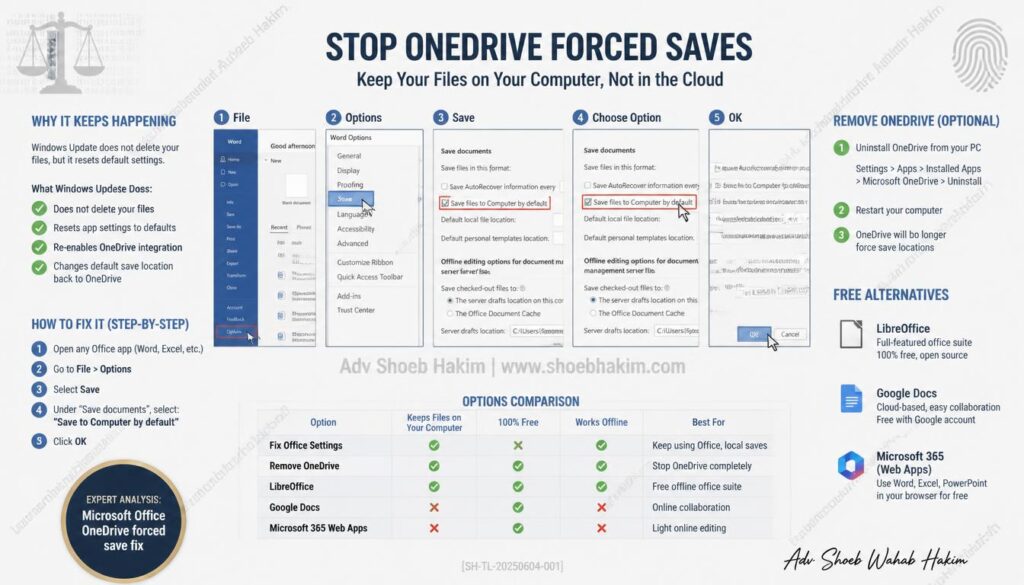
How to Fix It: Stop Forced OneDrive Saves
Step-by-Step Fix (Takes Under 2 Minutes)
- Open Word
- Go to File > Options > Save
- Check the box for “Save to Computer by default”
- Set your local file folder path
- Click OK
That’s it.
Once this setting is changed, Word will no longer default to OneDrive when saving new documents.
How to Remove or Unlink OneDrive
Option 1: Unlink OneDrive
- Right-click the OneDrive icon in the system tray
- Select Settings
- Go to the Account tab
- Click Unlink this PC
Option 2: Uninstall OneDrive Completely
- Open Settings > Apps > Installed Apps
- Find Microsoft OneDrive
- Click Uninstall
Option 3: Stop OneDrive from Syncing Specific Folders
- Open OneDrive Settings
- Go to the Sync and backup tab
- Click Manage backup
- Uncheck Desktop, Documents, and Pictures folders to stop automatic cloud syncing
Free Alternatives to Microsoft Office
If you do not want to pay for Microsoft Office, several free alternatives exist:
1. Microsoft 365 Web Apps (Free)
- Available in any browser
- Free versions of Word, Excel, PowerPoint, and other Office apps
- Feature restrictions but adequate for basic use
2. LibreOffice (Free and Local)
- Completely free, open-source office suite
- Works entirely offline — no cloud required
- Compatible with Microsoft Office file formats
- Runs on Windows, Mac, and Linux
3. Google Docs (Free, Cloud-Based)
- Free to use with a Google account
- Cloud-based document editing
- Collaboration features
- Accessible from any device
FREQUENTLY ASKED QUESTIONS (FAQ)
Q: Why do my Office applications suddenly look like basic viewers after an update?
Ans: When an update disrupts your license verification or a pre-installed trial expires, Word locks advanced editing features, converting the app into a restricted viewer until re-authenticated or subscribed.
Q: Are Progressive Web Apps (PWAs) replacing traditional Office desktop apps?
Ans: Windows updates occasionally substitute classic desktop icons with web-based PWAs, which mimic desktop software but enforce restrictions requiring active Microsoft 365 subscriptions.
Q: Can I completely remove OneDrive if I prefer local storage?
Ans: Yes. You can unlink your PC via OneDrive settings, stop folder syncing for Desktop and Documents, or completely uninstall OneDrive through system application settings.
Q: What free alternatives exist if I choose not to use Microsoft Office?
Ans: Viable options include LibreOffice (a fully offline, open-source suite), Google Docs (cloud-based collaboration), and free browser-based Microsoft 365 web apps.
Q:Does Windows update delete my paid Office license?
Ans:No. Windows updates do not permanently delete valid, paid desktop Office licenses. Instead, free trial periods expire, or pre-installed desktop apps are replaced by prompts to use Microsoft 365 web apps.
Q:Why does Word appear to have lost its features?
Ans:Word locks advanced editing tools when a free trial ends or an old license is unverified. It acts as a basic viewer until you subscribe to Microsoft 365 or reactivate your existing license.
Q:Why does Microsoft default to OneDrive?
Microsoft sets OneDrive as the default saving choice to encourage cloud backups, data synchronization, and ecosystem lock-in. This is part of a larger strategy to drive Office 365 subscriptions and reduce reliance on perpetual licenses.
Q:How do I stop OneDrive from saving my files by default?
Ans:Open Word, go to File > Options > Save, check “Save to Computer by default,” and set your local file folder path.
Can I uninstall OneDrive completely?
Ans:Yes. You can unlink OneDrive or uninstall it completely from your system settings.
What are Progressive Web Apps (PWAs)?
Ans:PWAs are web-based applications that mimic regular desktop apps. Windows updates sometimes replace classic desktop icons with PWAs that force users onto restricted, web-based versions requiring a Microsoft 365 purchase.
Are there free alternatives to Microsoft Office?
Ans:Yes. LibreOffice (free and local), Google Docs (free and cloud-based), and Microsoft 365 web apps (free, browser-based) are all viable alternatives.
Q:Why does a Windows system update trigger this issue?
Ans:Windows updates reset default app paths, overwrite shortcut pointers, and unlink original software licenses. They also re-enable OneDrive Backup, which hijacks local Desktop, Documents, and Pictures folders.
Q:How do I restore my local setup?
Change Word’s default save setting, unlink OneDrive, and reconfigure your default app paths.
Q:Is Microsoft phasing out perpetual Office licenses?
Yes. Microsoft is actively pushing users toward subscription-based Microsoft 365, phasing out perpetual licenses and the Microsoft Store distribution method in favor of Click-to-Run installers.
KNOWLEDGE CHECK QUIZ
Q: Do Windows updates permanently delete valid, paid desktop Office license files?
Ans: No. The underlying software files remain intact on the system; updates merely overwrite shortcut pointers, alter default app paths, and uncouple licensing tokens.
Q: Why do Word and other Office applications prompt users to subscribe after an update?
Ans: Updates can expire trial flags, disturb registry tokens, or replace classic desktop shortcuts with web-based Progressive Web Apps (PWAs) that demand a Microsoft 365 subscription.
Q: How does OneDrive folder syncing contribute to the illusion of data loss?
Ans: Updates frequently re-enable automatic backup settings that migrate local Desktop, Documents, and Pictures folders into the cloud, making local files appear missing when they are merely synced.
Q: What is the primary method to stop Word from defaulting to cloud storage?
Ans: Open Word, navigate to File > Options > Save, check the box for “Save to Computer by default,” and designate a local folder file path.
By Adv. Shoeb Hakim
Criminal defence, AML, digital forensics, and cybercrime specialist; former Head of AML & Client ID (AVP), Credit Suisse; training police and judiciary since 1995.
📌 Connect: https://www.linkedin.com/in/shoebhakim | https://shoebhakim.com/shoeb-hakim-blog/
📌 Visit my website for more articles: https://shoebhakim.com
📌 Visit my website for research fellowship: https://www.legalcomplaince.in
Disclaimer: This content is for informational purposes only and does not constitute legal advice. Readers should consult qualified legal counsel for advice on their specific circumstances.
#AdvShoebHakim #ThaiMobileAttacks #EmbeddedSecurity #Kaspersky #MobileBankingFraud #Cybersecurity #DigitalWallets #AML #DigitalForensics #WhiteCollarCrime #AppSecurity #LegalDefense
Additional Page Metadata (Structured for AI/GEO):
Author:
Adv. Shoeb Hakim
Author Bio (for schema markup):
Adv. Shoeb Hakim is a Mumbai-based criminal defence, AML, digital forensics and cybercrime specialist. Former Head of AML & Client ID (AVP) at Credit Suisse. Has been training police and judiciary since 1995. Provides expert commentary on technology law, consumer rights, and digital forensics.
Article Publisher:
Adv. Shoeb Hakim
Article Section:
Technology Law | Consumer Rights | Digital Forensics | Software Licensing
Article Tags:
Microsoft Office, OneDrive, Windows update, forced save, subscription model, Office 365, free alternatives, LibreOffice, Google Docs, Progressive Web Apps, cloud push, Adv Shoeb Hakim