Understanding cybersecurity starts with understanding the OSI model—and how attackers exploit every layer.
Introduction
Most people think cybersecurity is about firewalls, antivirus, and intrusion detection systems. They are looking at one layer. Attackers look at all seven.
The OSI (Open Systems Interconnection) model is not a textbook concept. It is a map of where you are exposed. Each layer represents a different part of network communication. And each layer has its own vulnerabilities.
This article breaks down how attackers exploit each OSI layer—and what you can do to defend them.
The OSI Model: A Quick Refresher
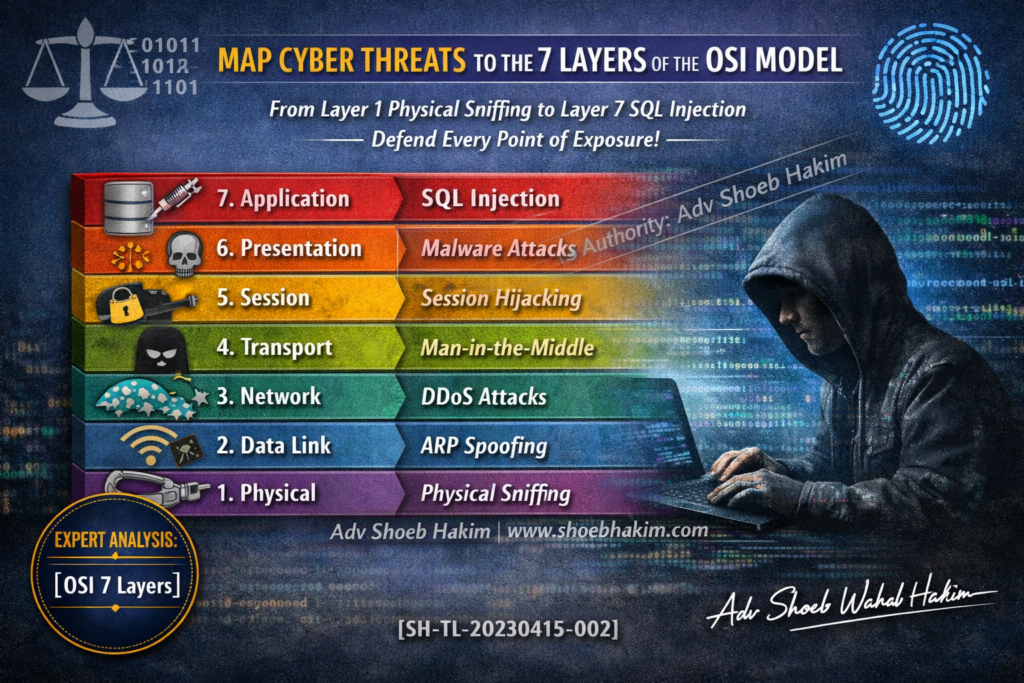
The OSI model has seven layers, from lowest (physical) to highest (application):
| Layer | Name | Function |
|---|---|---|
| 7 | Application | User-facing apps and services |
| 6 | Presentation | Data formatting, encryption, compression |
| 5 | Session | Manages connections between applications |
| 4 | Transport | End-to-end communication, error checking |
| 3 | Network | Routing, addressing (IP) |
| 2 | Data Link | Local network communication (MAC addresses) |
| 1 | Physical | Raw bits over cables, radio, hardware |
Layer 7: Application Layer – Exploits
Where: User-facing applications (web browsers, email clients, mobile apps, APIs)
How Attackers Exploit:
- SQL injection
- Remote Code Execution (RCE)
- Cross-Site Scripting (XSS)
- Logic flaws
- Authentication bypass
Real-World Examples:
- OWASP Top 10 web application vulnerabilities
- API abuse
- Zero-day exploits in popular software
Defense:
- Secure coding practices
- Input validation and sanitization
- Web Application Firewalls (WAF)
- Regular penetration testing
- Runtime application self-protection (RASP)
Layer 6: Presentation Layer – Phishing
Where: Data formatting, encryption, compression
How Attackers Exploit:
- Social engineering (phishing)
- Encoding attacks
- Compression bombs
- SSL/TLS stripping
Real-World Examples:
- Phishing emails that bypass filters
- Malicious PDFs with embedded exploits
- HTTPS spoofing
Defense:
- User training on phishing detection
- Email filtering and DMARC
- Certificate validation
- End-to-end encryption for sensitive data
Layer 5: Session Layer – Hijacking
Where: Session management between applications
How Attackers Exploit:
- Session hijacking (stealing session tokens/cookies)
- Session fixation (forcing a known session ID)
- API token theft
- Session replay attacks
Real-World Examples:
- Stealing session cookies from unencrypted Wi-Fi
- Cloud console session hijacking
- API session token interception
Defense:
- Short session timeouts
- Encrypted session tokens
- IP binding for sessions
- Multi-factor authentication
- Secure flag on cookies
Layer 4: Transport Layer – Reconnaissance
Where: End-to-end communication, error checking
How Attackers Exploit:
- Port scanning
- Service fingerprinting
- SYN floods
- UDP reflection attacks
Real-World Examples:
- Reconnaissance before a targeted attack
- DDoS amplification
- Firewall evasion
Defense:
- Rate limiting
- DDoS protection services
- Port filtering
- Intrusion Detection/Prevention Systems (IDS/IPS)
Layer 3: Network Layer – Man-in-the-Middle (MITM)
Where: Routing and addressing (IP)
How Attackers Exploit:
- Man-in-the-Middle (MITM) attacks
- IP spoofing
- Routing table poisoning
- DNS spoofing
Real-World Examples:
- Evil twin Wi-Fi attacks
- Rogue routers
- BGP hijacking
Defense:
- IPsec/VPN for sensitive traffic
- DNSSEC
- BGP security (ROA/RPKI)
- Static ARP entries where feasible
Layer 2: Data Link Layer – Spoofing
Where: Local network communication (MAC addresses)
How Attackers Exploit:
- ARP poisoning (ARP spoofing)
- MAC flooding
- VLAN hopping
- MAC spoofing
Real-World Examples:
- Intercepting traffic on local network
- Bypassing MAC filtering
- Man-in-the-Middle on switched networks
Defense:
- Port security
- Dynamic ARP Inspection (DAI)
- DHCP snooping
- Network segmentation
Layer 1: Physical Layer – Sniffing
Where: Raw bits over cables, radio, hardware
How Attackers Exploit:
- Physical sniffing (tapping cables)
- Wireless interception
- Hardware keyloggers
- Rogue devices
Real-World Examples:
- Wardriving for open Wi-Fi
- USB keyloggers
- RJ45 taps on exposed switches
- Electromagnetic eavesdropping
Defense:
- Physical access controls
- Cable locks and secure wiring closets
- WPA3 for wireless
- Device whitelisting
- Tamper-evident seals
The Layer Everyone Forgets: Layer 8 – The Human Layer
Security professionals often focus on Layers 1 through 7. They forget Layer 8: the human being using the system.
How Attackers Exploit:
- Social engineering
- Pretexting
- Baiting
- Tailgating
- Phishing (already mentioned at Layer 6, but the target is human)
Real-World Examples:
- Business Email Compromise (BEC)
- Calling helpdesk for password resets
- USB drops in parking lots
Defense:
- Security awareness training
- Phishing simulations
- Clear policies on information sharing
- Multi-factor authentication (bypasses most credential theft)
Which Layer Is Most Vulnerable in Modern Environments?
The answer depends on your environment:
| Environment | Most Vulnerable Layer | Reason |
|---|---|---|
| Traditional on-premise | Layer 2 (Data Link) | Flat networks, ARP poisoning still effective |
| Cloud-native | Layer 7 (Application) | APIs exposed to internet, misconfigurations |
| Hybrid work | Layer 5 (Session) | Session tokens traversing untrusted networks |
| Critical infrastructure | Layer 1 (Physical) | Hardware access, industrial espionage |
| Any environment | Layer 8 (Human) | Social engineering bypasses all technical controls |
Key Takeaway
Cybersecurity is not just about protecting apps. It is about securing every layer of communication.
Attackers do not think in silos. They move across layers. They start with reconnaissance at Layer 4, pivot to MITM at Layer 3, exploit an application at Layer 7, steal session tokens at Layer 5, and cover their tracks at Layer 2.
Your defense must be layered too.
- Firewalls protect Layers 3 and 4
- WAFs protect Layer 7
- IDS/IPS monitor Layers 2 through 7
- Encryption protects Layers 5 and 6
- Physical security protects Layer 1
- Training protects Layer 8
One layer is never enough. The attackers know this. So must the defenders.
Adv. Shoeb Hakim
Cyber Security & Network Defense Advisor
📌 Follow me on LinkedIn for daily cybersecurity insights: https://www.linkedin.com/in/shoebhakim
📌 Visit my website for more articles: shoebhakim.com
♻️ Share this article with your security team.
Disclaimer: This article is for informational purposes only and does not constitute legal advice.
Hashtags: #OSIModel #CyberSecurity #NetworkSecurity #InfoSec #CyberAttacks #LayeredSecurity #ThreatIntelligence #ApplicationLayer #NetworkLayer #DataLinkLayer #PhysicalLayer #HumanLayer #SocialEngineering #DefenseInDepth #AdvShoebHakim
#Layer7Attack #MITM #ARPPoisoning #SocialEngineering #SecurityArchitecture #TechStrategy #CiscoNetworking #CyberAwareness