

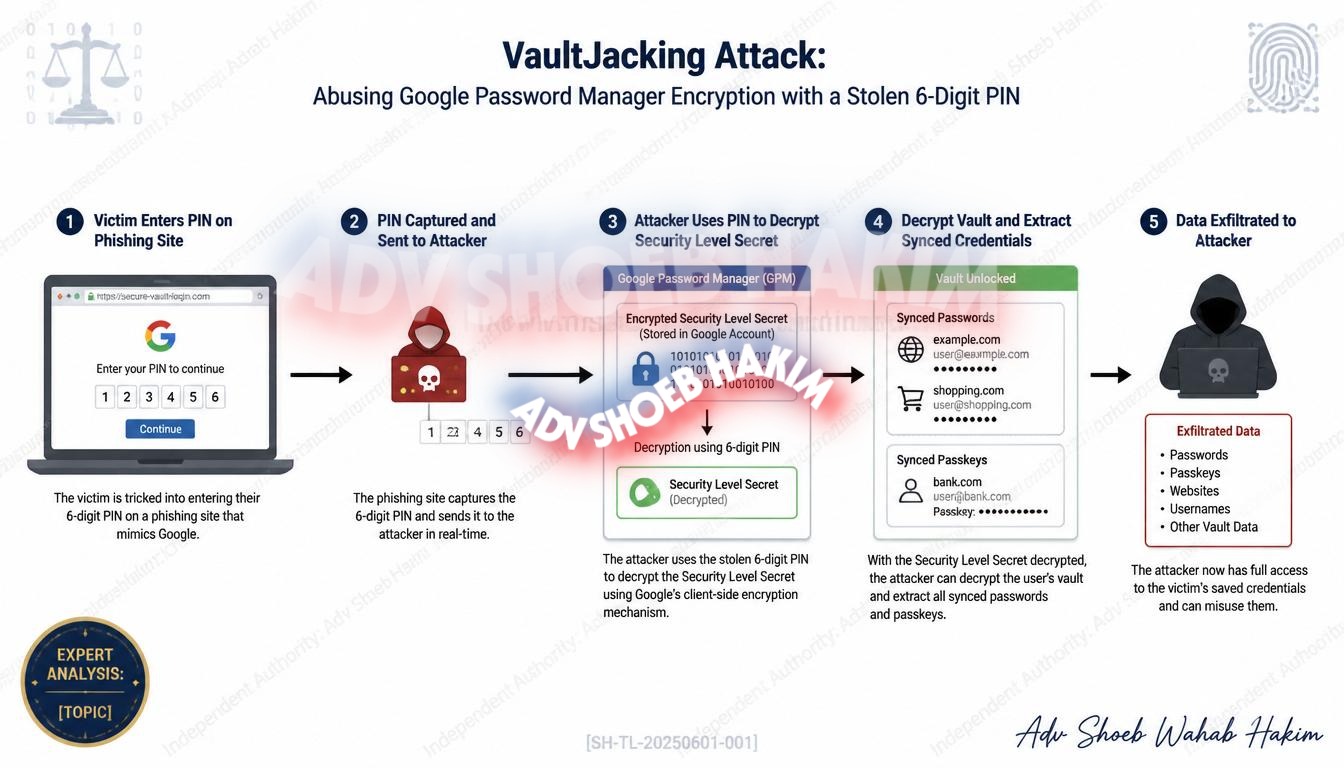
No malware. No prior device access. Just a 6-digit PIN. Every saved password and passkey is compromised.
Introduction
One captured 6-digit PIN. That is all an attacker needs.
No malware. No prior access to your device. Just the PIN you use to unlock Google Password Manager.
With it, an attacker can walk away with your entire password vault. Every saved password. Every passkey. Every login.
This is not a theoretical risk. Researchers at PhishU have identified and documented a fully demonstrated, end-to-end attack called VaultJacking.
This article explains how the attack works, why it is dangerous, and what you can do to protect yourself.
What Is VaultJacking?
VaultJacking is a phishing technique that allows attackers to steal an entire Google Password Manager vault using nothing more than a captured 6-digit PIN.
The researchers: PhishU
The target: Google Password Manager (GPM)
The impact: Complete theft of all saved passwords and passkeys
How the Attack Works
Step 1: The Phishing Page
The victim is tricked into entering their GPM PIN on a fake sign-in page carefully styled to match Google’s real prompt.
Step 2: The PIN Is Captured
That single credential becomes the master key to the victim’s entire synced vault.
Step 3: New Device Registration
The attacker uses the captured PIN to register a new device on the victim’s security domain. This exploits Google’s Security Token Service and its use of a Security Level Secret to unlock sync across devices.
Step 4: Vault Decryption
When the correct GPM PIN is entered on the phishing page, it unlocks the Security Level Secret on the operator’s infrastructure and decrypts the synced vault.
Step 5: Credential Theft
Every stored credential is sent directly to the attacker.
Why VaultJacking Is Dangerous
| Feature | Traditional Phishing | VaultJacking |
|---|---|---|
| Malware required | Often | No |
| Prior device access | Sometimes | No |
| Session cookies needed | Yes | No |
| Hardware-backed passkeys safe | Usually | No |
| Rate limiting protection | Yes | No |
What makes VaultJacking particularly dangerous:
- No pre-existing foothold required – The attacker does not need any prior access to the victim’s device.
- No malware needs to be installed – The attack works through a simple phishing page.
- Bypasses Google’s Live Device Found Session Credentials defense – The attacker’s sync component uses the captured credentials and an operator-owned passkey to authenticate from operator infrastructure, well after the original session cookies have expired.
- Even hardware-backed passkeys are recovered – Passkeys in Chrome 359 and later write their private-key bytes to the local Passkeys SQLite database. Those raw bytes travel with the sync payload, meaning even hardware-backed passkeys are stolen.
- No rate limiting – No rate limiting or re-entry prompt stands in the way once the PIN is captured.
The Technical Details
Google Password Manager synchronization:
Google Password Manager synchronizes passkeys and passwords across every device logged into the same Google account. It stores everything encrypted with a key tied to the user’s Security Level Secret, which is itself protected by the 6-digit GPM PIN.
The PhishU framework:
The PhishU framework’s sync-dup component drives a fresh Chrome instance with the captured PIN and operator-owned passkey, authenticates into the victim’s Google account from operator infrastructure, and downloads every synced password and passkey in the vault.
The result: One captured PIN. No prior installation. The entire vault is compromised.
Defending Against VaultJacking
Security professionals should treat this as an accepted-design trade-off rather than an unpatched bug awaiting a vendor fix. PhishU outlined several practical steps organizations and individuals can take to reduce their exposure.
For Individuals:
- Do not use your work Chrome profile to store personal site credentials. A work-targeted phishing agent that captures Google session flows exposes the personal vault alongside work credentials. The attacker does not distinguish between them.
- Use a dedicated Chrome profile to store personal site credentials and passkeys separately.
- Treat notifications like “new passkey added” or “new sign-in on Windows” as authentication events worth verifying every time. These are the only visible outward signals the attack produces.
For Organizations:
- Deploy on-premises password managers for environments that never interact with Google Sync. These are not affected by VaultJacking.
- Enforce authentication-resistant monitoring and security-domain governance. Organizations that have deployed passkeys without these controls are already operating against this exact threat model.
- Focus on the policy and monitoring layer. The attack surface lives there. That is where defenders need to focus their attention.
The Right Response
The right response is not to abandon passkeys. Passkeys remain a significant security improvement over traditional passwords.
The right response is to deploy tighter tiering and actively monitor the sync-layer architecture.
Key actions:
- Separate work and personal credentials using different Chrome profiles
- Do not store personal passwords in work-managed profiles
- Monitor for unusual device registrations on Google accounts
- Verify every “new passkey added” notification
- Consider on-premises password managers for sensitive environments
Conclusion
A new phishing technique called VaultJacking has emerged, and it is raising serious alarms across the cybersecurity community.
With just a single captured 6-digit PIN, an attacker can walk away with an entire Google Password Manager vault, including every saved password and passkey stored inside.
This is not a theoretical risk. It is a fully demonstrated, end-to-end attack that exploits the way Google synchronizes credentials across devices.
No malware required on the victim’s device. No prior foothold needed. One captured PIN. The entire vault is compromised.
The right response is not to abandon passkeys but to deploy tighter tiering and actively monitor the sync-layer architecture. The attack surface lives at the policy and monitoring layer. That is where defenders need to focus their attention.
Q: How does the VaultJacking Attack differ from traditional credential phishing? Ans: Unlike traditional phishing that targets specific passwords or session cookies, the VaultJacking Attack targets the master 6-digit PIN. By capturing this single PIN, the attacker mimics a legitimate device synchronization request, pulling the entire encrypted vault (including all passwords and passkeys) directly onto their own infrastructure.
Q: Can I prevent VaultJacking by enabling Two-Factor Authentication (2FA) on my Google account? Ans: While 2FA is critical for general account security, VaultJacking specifically targets the Google Password Manager’s synchronization layer. If the attacker convinces you to authenticate the phishing prompt or captures the specific GPM PIN, they leverage Google’s own Security Token Service to bypass standard session defenses.
Q: What is the most effective way for an organization to defend against this threat? Ans: Organizations must strictly separate work and personal credentials. Employees should be forbidden from logging their personal Google accounts into enterprise-managed Chrome browsers. For highly sensitive environments, deploying an air-gapped or on-premises password manager that does not utilize Google Sync is the strongest defense.
Q: What is the only piece of information an attacker needs to execute a VaultJacking attack? Ans: A captured 6-digit Google Password Manager PIN.
Q: Does VaultJacking require malware to be installed on the victim’s device? Ans: No, it operates entirely without malware or prior device access by exploiting the sync architecture.
Q: Why are hardware-backed passkeys vulnerable to this specific attack? Ans: Because Chrome writes the private-key bytes to the local Passkeys SQLite database, which travels with the synchronized payload directly to the attacker.
Q: What are the primary visible warning signs that a VaultJacking attack has occurred? Ans: System notifications such as “new passkey added” or a “new sign-in on Windows” alert.
Adv. Shoeb Hakim
Cyber Security & Digital Identity Advisor
📌 Follow me on LinkedIn for daily cyber security insights: https://www.linkedin.com/in/shoebhakim
📌 Visit my website for more articles: https://www.shoebhakim.com
📌 Visit my website for legal knowledge: https://www.vakilverse.com
📌 Visit my website for research fellowship: https://www.legalcomplaince.in
♻️ Share this article with your network.
Disclaimer: This article is for informational purposes only and does not constitute legal advice.
Hashtags: #AdvShoebHakim #VaultJacking #GooglePasswordManager #CyberSecurity #Passkeys #Phishing #PasswordSecurity #InfoSec #IdentityTheft #GoogleAccount #CyberAttack #MFA #2FA #SecurityAwareness