

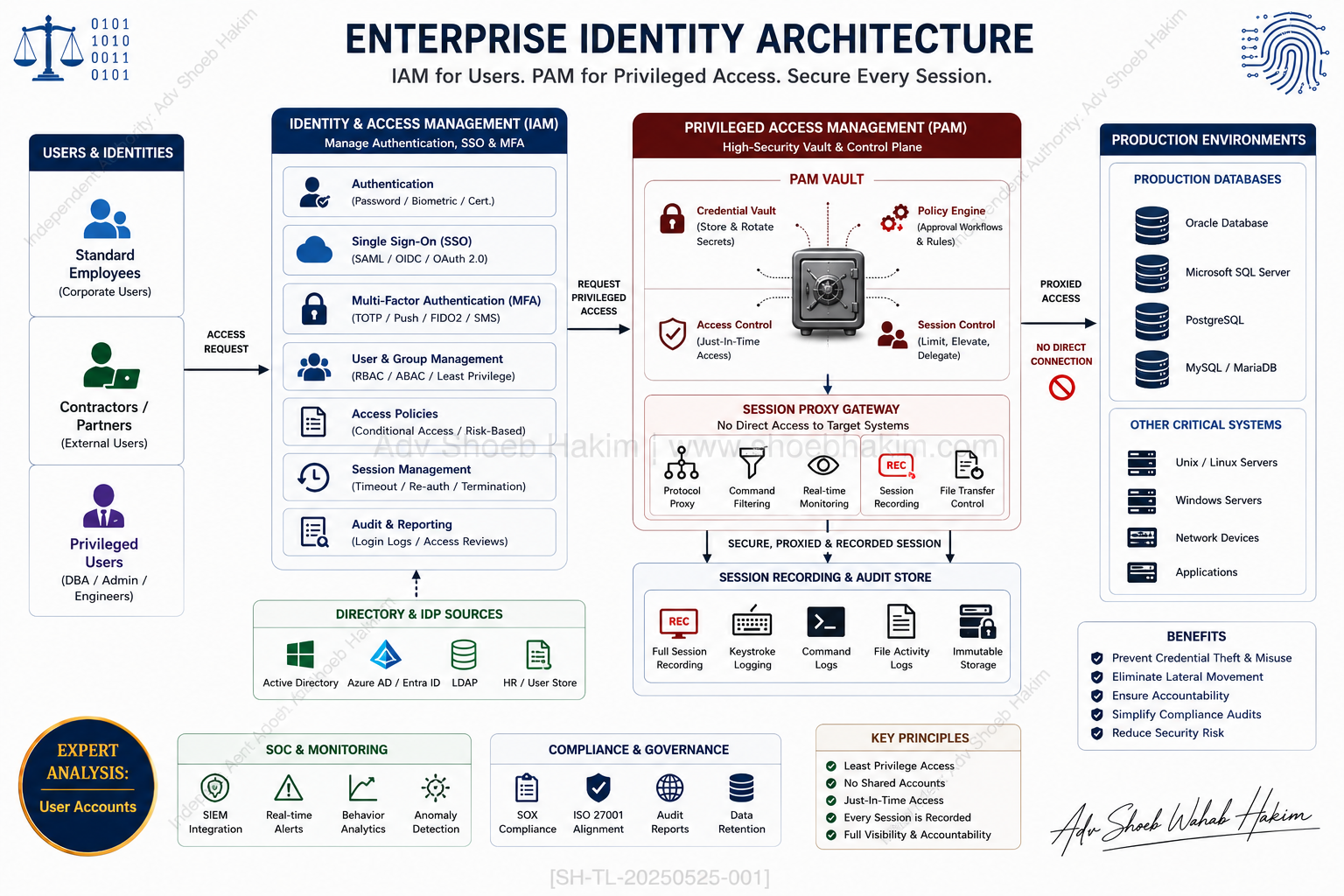
Identity & Access Management and Privileged Access Management serve different purposes. A strong security architecture needs both.
Introduction
In cybersecurity, Identity & Access Management (IAM) and Privileged Access Management (PAM) are often mentioned together — but they serve different purposes.
They are not interchangeable. They are not redundant. They are complementary.
This article explains the difference between IAM and PAM, why each is essential, and how they work together to protect organizations from data breaches, insider threats, and privilege misuse.
What Is IAM (Identity & Access Management)?
IAM focuses on managing access for general users such as employees, customers, and vendors.
Key functions of IAM:
| Function | Description |
|---|---|
| Authentication | Verifying user identity (passwords, biometrics, MFA) |
| Onboarding | Creating user accounts and assigning initial access |
| SSO (Single Sign-On) | Allowing users to access multiple applications with one login |
| MFA (Multi-Factor Authentication) | Adding additional verification layers |
| User provisioning | Creating, updating, and deleting user accounts |
| Lifecycle management | Managing access from hire to termination |
The IAM question:
“Who are you, and what basic access should you have?”
IAM improves:
- Accessibility (users can work efficiently)
- Efficiency (automated provisioning and deprovisioning)
- User experience (SSO reduces password fatigue)
What Is PAM (Privileged Access Management)?
PAM protects high-risk privileged accounts such as administrators, database admins, and system-to-system accounts.
Key functions of PAM:
| Function | Description |
|---|---|
| Session recording | Recording privileged sessions for audit and review |
| Just-in-time access | Granting privileged access only when needed, for limited duration |
| Least privilege enforcement | Granting minimum necessary privileges |
| Secret vaulting | Storing passwords, keys, and secrets in encrypted vaults |
| Auditing | Logging and reviewing all privileged access |
| Access request workflows | Approving privileged access requests |
The PAM question:
“Should you have privileged access, for how long, and under what controls?”
PAM reduces:
- Risk of privilege misuse
- Insider threats
- Data breach impact
- Lateral movement by attackers
Key Differences Between IAM and PAM
| Aspect | IAM | PAM |
|---|---|---|
| User type | General users (employees, customers, vendors) | Privileged users (admins, DBAs, system accounts) |
| Access level | Standard access | High-risk, privileged access |
| Primary goal | Accessibility and efficiency | Security and risk reduction |
| Key features | SSO, MFA, provisioning | Session recording, JIT access, secret vaulting |
| Core question | “Who are you?” | “Should you have this access, for how long, and under what controls?” |
| Risk focus | Identity theft, credential compromise | Privilege misuse, insider threats |
Why Both IAM and PAM Are Essential
Scenario 1: IAM without PAM
An organization implements IAM with SSO and MFA. General users are well-managed. However, privileged accounts (administrators, service accounts) are not secured. No session recording. No just-in-time access. No secret vaulting.
Risk: An attacker who compromises a privileged account can move laterally, install ransomware, or exfiltrate data without detection. The organization has no audit trail of privileged activity.
Scenario 2: PAM without IAM
An organization implements PAM for privileged accounts. Session recording and secret vaulting are in place. However, general user access is unmanaged. No SSO. No MFA. No automated provisioning.
Risk: An attacker compromises a general user account through phishing. They use that access to discover information, escalate privileges, and eventually reach privileged accounts. The organization has no visibility into general user activity.
Scenario 3: IAM and PAM together
IAM manages general user access. PAM secures privileged access. Both are monitored, audited, and integrated.
Result: Complete access governance. Visibility into all access. Reduced risk of breach.
How IAM and PAM Work Together
| Capability | How IAM and PAM integrate |
|---|---|
| Identity lifecycle | IAM provisions user. PAM manages privileged access for that user when needed |
| Authentication | IAM provides MFA. PAM adds additional verification for privileged access |
| Access requests | IAM handles standard access requests. PAM handles privileged access requests |
| Auditing | IAM logs standard access. PAM logs privileged sessions and commands |
| Termination | IAM revokes standard access. PAM rotates secrets and revokes privileged access |
Common Misconceptions
| Misconception | Reality |
|---|---|
| “PAM is just a more advanced IAM” | PAM and IAM serve different purposes. PAM is not a superset of IAM. |
| “If we have IAM, we don’t need PAM” | IAM does not secure privileged accounts. PAM is essential for privileged access. |
| “If we have PAM, we don’t need IAM” | PAM does not manage general user access. IAM is essential for standard access. |
| “Small organizations don’t need PAM” | Even small organizations have privileged accounts. Attackers target them specifically. |
Regulatory and Compliance Drivers
| Regulation | IAM Requirement | PAM Requirement |
|---|---|---|
| SOX | User access controls, segregation of duties | Privileged access monitoring |
| HIPAA | Unique user identification, access management | Audit logs for privileged access |
| PCI DSS | Unique IDs, MFA, access management | Session recording, least privilege |
| GDPR | Access controls, data protection | Audit trails for privileged access |
| ISO 27001 | Access control policy, user registration | Privileged access restriction |
Implementation Best Practices
For IAM:
- Implement SSO to reduce password fatigue and improve security
- Enforce MFA for all users, especially remote access
- Automate provisioning and deprovisioning
- Conduct regular access reviews
- Integrate IAM with HR systems for automated lifecycle management
For PAM:
- Discover all privileged accounts (human and non-human)
- Implement just-in-time access for all privileged requests
- Enforce least privilege for all accounts
- Vault all secrets (passwords, keys, certificates)
- Record all privileged sessions for audit
- Rotate secrets automatically
For integration:
- Use common identity source (e.g., Active Directory, Azure AD, Okta)
- Implement single approval workflow for both standard and privileged access
- Centralize logging and monitoring
- Automate termination across both IAM and PAM
The Zero Trust Connection
Both IAM and PAM are foundational to Zero Trust architecture.
Zero Trust principles:
- Never trust, always verify
- Least privilege access
- Assume breach
- Verify explicitly
How IAM and PAM support Zero Trust:
| Zero Trust Principle | IAM Contribution | PAM Contribution |
|---|---|---|
| Never trust, always verify | MFA, continuous authentication | JIT access, session recording |
| Least privilege | Standard user permissions | Privileged access limits |
| Assume breach | Logging and monitoring | Audit trails, session recording |
| Verify explicitly | Step-up authentication | Access request workflows |
Conclusion
In cybersecurity, Identity & Access Management (IAM) and Privileged Access Management (PAM) are often mentioned together — but they serve different purposes.
IAM focuses on managing access for general users such as employees, customers, and vendors. It helps organizations streamline authentication, onboarding, application access, SSO, MFA, and user provisioning.
PAM, on the other hand, protects high-risk privileged accounts such as administrators, database admins, and system-to-system accounts. It focuses on securing critical access through session recording, just-in-time access, least privilege enforcement, secret vaulting, and auditing.
IAM asks: “Who are you, and what basic access should you have?”
PAM asks: “Should you have privileged access, for how long, and under what controls?”
Both are essential. IAM improves accessibility and efficiency, while PAM reduces the risk of privilege misuse, insider threats, and data breaches.
A strong security architecture needs both IAM and PAM working together.
Knowledge Check Quiz
- What is the primary difference in user base focus between IAM and PAM platforms?
- Ans: IAM manages standard horizontal access for the general user base (employees, customers, vendors), while PAM focuses strictly on high-risk, privileged accounts (administrators, DBAs, service profiles).
- Why is a standing administrative account considered a major architectural vulnerability?
- Ans: Persistent administrative privileges provide an ongoing target for threat actors, enabling rapid lateral movement and immediate structural takeover if compromised.
- What core security methodology dictates that users should only receive the minimum access required to execute specific tasks?
- Ans: The principle of Least Privilege.
- How do IAM and PAM systems work together during a corporate employee termination event?
- Ans: The IAM platform instantly revokes the user’s primary corporate identity and application access, while the PAM platform automatically deactivates any associated privileged access rights and rotates infrastructure credentials.
Frequently Asked Questions (FAQ)
Q: Can a company replace its PAM platform entirely if it has implemented an advanced IAM suite with MFA? Ans: No. IAM suites excel at validating who a user is and provisioning basic application access across a broad population. However, they lack the technical capability to manage infrastructure-level secrets, execute real-time proxy session recording, or enforce just-in-time administrative command filtering, which are exclusive to PAM architectures.
Q: What is Just-In-Time (JIT) access within a Privileged Access Management context? Ans: Just-In-Time access is a security practice where administrative permissions are granted only when explicitly requested and approved, remaining active for a strictly limited duration. Once the administrative task is completed, the privileges are automatically revoked, minimizing the window of opportunity for an exploit.
Q: How does a lack of identity integration impact an organization’s legal position after a security breach? Ans: If an organization fails to maintain distinct access governance and unalterable audit trails for its privileged accounts, it cannot demonstrate compliance with statutory “due care” mandates. This clear lack of reasonable technical oversight leaves the company highly vulnerable to severe regulatory fines and successful civil litigation.
Adv. Shoeb Hakim
Cyber Security & Identity Governance Advisor
📌 Follow me on LinkedIn for daily cyber security and identity governance insights: https://www.linkedin.com/in/shoebhakim
📌 Visit my website for more articles: https://www.shoebhakim.com
📌 Visit my website for legal knowledge: https://www.vakilverse.com
📌 Visit my website for research fellowship: https://www.legalcomplaince.in
♻️ Share this article with your network.
Disclaimer: This article is for informational purposes only and does not constitute legal advice.
Hashtags: #AdvShoebHakim #IAM #PAM #IdentityManagement #PrivilegedAccessManagement #CyberSecurity #AccessManagement #SSO #MFA #LeastPrivilege #ZeroTrust #InsiderThreat #DataBreach #SecurityArchitecture #IdentityGovernance #Authentication #Authorization #UserProvisioning #LifecycleManagement #JustInTimeAccess #SessionRecording #SecretVaulting #PrivilegedAccounts #ServiceAccounts #AdminAccounts #DatabaseAdmins #SystemToSystem #AccessRequests #AuditTrails #Compliance #SOX #HIPAA #PCIDSS #GDPR #ISO27001 #ActiveDirectory #AzureAD #Okta #PingIdentity #CyberArk #BeyondTrust #Delinea #Thycotic #Centrify #OneIdentity #SailPoint #Saviynt #ForgeRock #IdentityNow #IdentityCloud #PrivilegedSessionManagement #PSM #PrivilegedCommandManagement #PCM #ApplicationControl #EndpointPrivilegeManagement #EPM #CloudInfrastructureEntitlementManagement #CIEM #AccessGovernance #IdentityAnalytics #RiskBasedAuthentication #ContinuousAuthentication #StepUpAuthentication #AdaptiveAccess #ConditionalAccess #IdentityThreatDetection #IdentityProtection #IdentityAttackSurface #IdentityBreach #IdentityTheft #CredentialStuffing #PasswordSpraying #PhishingResistant #FIDO2 #WebAuthn #Passkeys #BiometricAuthentication #HardwareSecurityKey #YubiKey #GoogleTitan #MicrosoftAuthenticator #OktaVerify #DuoSecurity #RSA #SecureID
Leave a Reply